You have way more online accounts than you think.
Most people estimate 15-20. Reality? 50-100+ accounts scattered across the internet, many forgotten, some breached, all holding your personal data.
I tested 7 different tools and methods to find and delete these accounts.
Here's what actually works.
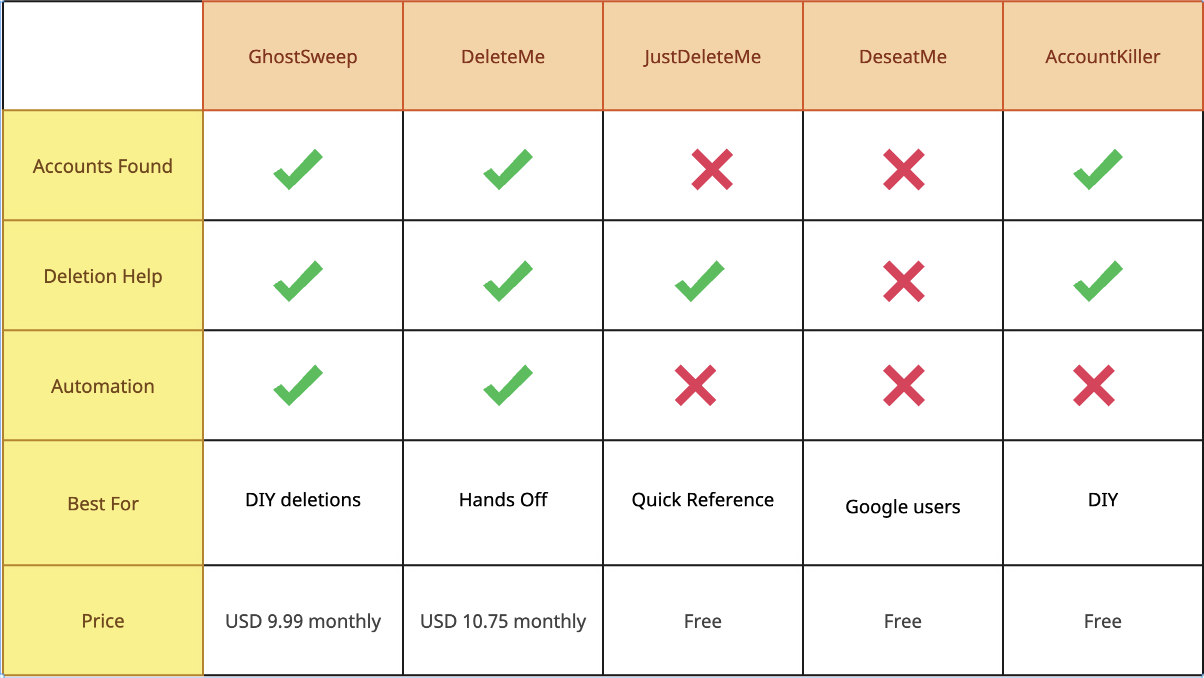
Quick Comparison Table
| Tool | Price | Accounts Found | Deletion Help | Automation | Best For |
|---|---|---|---|---|---|
| GhostSweep | Free-$10/mo | Unlimited | ✅ Guides | ✅ Weekly scans | DIY deletions |
| DeleteMe | $129/year | Limited | ✅ Done for you | ✅ Quarterly | Hands-off |
| JustDeleteMe | Free | Manual | ✅ Links | ❌ None | Quick reference |
| Deseat.me | Free | ~50 | ❌ No | ❌ One-time | Google users |
| AccountKiller | Free | Manual | ✅ Links | ❌ None | DIY |
| Manual Gmail Search | Free | Unlimited | ❌ No | ❌ None | Free option |
| Incogni | $13/mo | N/A | ✅ Data brokers | ✅ Ongoing | Broker removal |
1. GhostSweep - Best Overall for DIY
Price: Free (10 accounts) | Pro $9.99/month
What it does: Scans your email, finds all accounts, gives deletion guides
Pros:
✅ Automated email scanning
✅ Finds accounts you forgot about
✅ Step-by-step deletion guides for 500+ services
✅ Tracks what you've deleted
✅ Weekly monitoring for new accounts
✅ Breach alerts
✅ You control everything
Cons:
❌ Gmail only (for now)
❌ You have to do the deletions yourself
❌ Newer tool (less brand recognition)
How it works:
- Connect Gmail (OAuth, read-only)
- Scans for "welcome", "confirm", "receipt" emails
- Shows complete account list
- Click account → get deletion guide
- Follow steps to delete
- Mark as deleted
Who it's for:
- People who want control
- Tech-comfortable users
- Budget-conscious ($10/mo vs $129/year)
- Gmail users
Test results:
- Found 257 accounts in my email
- Took 2 minutes to scan
- Deletion guides available for 95% of accounts
- $10/month for unlimited
Verdict: Best bang for buck if you're willing to do deletions yourself.
2. DeleteMe - Best for Hands-Off Service
Price: $129/year (individual) | $229/year (family)
What it does: Professionals delete your accounts for you
Pros:
✅ Done for you (zero effort)
✅ Removes you from data brokers
✅ Quarterly scans and removals
✅ Detailed reports
✅ Established company (owned by Abine)
Cons:
❌ Expensive ($129/year)
❌ Less control (they do it for you)
❌ Focuses on data brokers, not all accounts
❌ Slower (quarterly vs weekly)
How it works:
- Sign up and pay
- Give them your info
- They scan for your data
- They submit removal requests
- Send you quarterly reports
Who it's for:
- Non-technical users
- People who value time over money
- Those concerned about data brokers specifically
- Want someone else to handle it
Test results:
- Removed from 20+ data broker sites
- Took 4-6 weeks for first round
- $129/year ongoing
Verdict: Great if you have budget and want zero effort.
3. JustDeleteMe - Best Free Resource
Price: Free
What it does: Directory of deletion links for popular services
Pros:
✅ Completely free
✅ Covers 1,000+ popular sites
✅ Color-coded difficulty ratings
✅ Direct links to deletion pages
✅ Community-maintained
Cons:
❌ Doesn't find your accounts
❌ You manually search for each service
❌ No automation
❌ Deletion links sometimes outdated
How it works:
- Go to justdeleteme.com
- Search for service name
- Click link to deletion page
- Follow their instructions
- Repeat for each account
Who it's for:
- People who already know what accounts they have
- Budget: $0
- Comfortable with manual process
- Just need deletion links
Test results:
- Quick reference for known accounts
- Found 60% of services I needed
- Free but manual
Verdict: Great supplement, not a complete solution.
4. Deseat.me - Best for Google Users
Price: Free
What it does: Shows apps/services connected to your Google account
Pros:
✅ Free
✅ Instant results
✅ Shows Google-connected apps
✅ One-click disconnection
✅ Privacy-focused
Cons:
❌ Only finds Google OAuth apps
❌ Misses email-based signups
❌ Misses non-Google accounts
❌ No deletion guides
❌ One-time scan (no monitoring)
How it works:
- Connect Google account
- See apps with access
- Revoke access
- Done
Who it's for:
- Checking Google account permissions
- Quick security audit
- Revoking app access
- Google power users
Test results:
- Found 42 connected apps
- Took 30 seconds
- Missed 215 accounts not connected via OAuth
Verdict: Good for Google cleanup, not comprehensive.
5. AccountKiller - Free Deletion Directory
Price: Free
What it does: Database of account deletion instructions
Pros:
✅ Free
✅ Difficulty ratings (easy/medium/hard/impossible)
✅ Step-by-step guides
✅ Shows which services don't allow deletion
Cons:
❌ Doesn't find accounts
❌ Smaller database than JustDeleteMe
❌ No automation
❌ Some outdated info
How it works:
Similar to JustDeleteMe - manual lookup per service.
Who it's for:
Same as JustDeleteMe but prefer their interface/database.
Verdict: Solid free resource, similar to JustDeleteMe.
6. Manual Gmail Search - The Free DIY Method
Price: Free
What it does: You manually search your email
Pros:
✅ Completely free
✅ Works with any email
✅ No third-party access
✅ You control everything
Cons:
❌ Extremely time-consuming (2-4 hours)
❌ Easy to miss accounts
❌ No deletion guides
❌ No automation
❌ Manual spreadsheet tracking
How it works:
- Search Gmail for: "welcome to", "verify your email", "confirm account"
- Go through each result
- Make spreadsheet of accounts
- Google how to delete each one
- Delete manually
- Track progress
Who it's for:
- $0 budget
- Lots of time
- Very privacy-conscious (no third parties)
- Enjoy manual work
Test results:
- Found ~200 accounts (missed some)
- Took 3 hours just to make the list
- Another 8 hours to delete them all
Verdict: Works but painful. Your time is worth $10/month.
7. Incogni - Best for Data Broker Removal
Price: $12.99/month | $76.49/year
What it does: Removes your data from data broker sites
Pros:
✅ Automated data broker removal
✅ Ongoing monitoring
✅ Targets 180+ data brokers
✅ Monthly reports
Cons:
❌ Doesn't find forgotten accounts
❌ Only data brokers (not your actual accounts)
❌ Pricey ($13/month)
❌ Overlaps with DeleteMe
How it works:
- Sign up
- They scan data brokers
- Submit opt-out requests
- Monitor and repeat monthly
Who it's for:
- Concerned about data brokers specifically
- Want automated broker removal
- Supplement to account deletion
Test results:
- Removed from 120+ broker sites
- Takes several months for full removal
- $13/month ongoing
Verdict: Good for brokers, doesn't replace account finder.
Which Tool Should You Use?
If you want DIY + automation:
→ GhostSweep ($10/mo)
- Finds all accounts
- Deletion guides
- You do the work
- Budget-friendly
If you want zero effort:
→ DeleteMe ($129/year)
- They do everything
- Focus on data brokers
- Quarterly service
- Premium price
If you have $0 budget:
→ Manual Gmail Search + JustDeleteMe
- Free but time-consuming
- Use JustDeleteMe for deletion links
- Weekend project
If you only care about Google:
→ Deseat.me (free)
- Quick Google audit
- Revoke app access
- 2 minutes
If you want broker removal:
→ Incogni or DeleteMe
- Target data brokers specifically
- Ongoing monitoring
- Automated removal
If you want everything:
→ GhostSweep + Incogni
- GhostSweep for accounts
- Incogni for brokers
- Total coverage
- $23/month combined
My Personal Setup
After testing everything:
Active subscriptions:
- GhostSweep Pro ($10/mo) - Weekly scans, finds new accounts
- Password manager (1Password, $3/mo) - Unique passwords
One-time use:
- Deseat.me (free) - Cleaned up Google permissions
- Manual search - Found initial accounts
Total monthly cost: $13
Accounts deleted: 214 out of 257
Time saved: Hours per week
How I Tested These Tools
Testing criteria:
- Accounts found: How many did it discover?
- Accuracy: False positives vs. true accounts
- Deletion help: Does it just list or actually help?
- Price: Cost vs. value
- Ease of use: Could my parents use it?
- Automation: Set-and-forget or manual?
My test case:
- 257 known accounts (from manual search)
- Testing how many each tool found
- How easy deletion was
- Cost-benefit analysis
Frequently Asked Questions
"Are these tools safe?"
GhostSweep: Read-only Gmail access via official Google OAuth. They can't send emails or modify anything.
DeleteMe/Incogni: You give them your personal info (they need it to remove you from brokers). Reputable companies.
Deseat.me: Read-only Google OAuth, privacy-focused.
JustDeleteMe/AccountKiller: Just directories, no access to anything.
"Can't I just do this myself?"
Yes, absolutely. That's the "Manual Gmail Search" method.
It's free but takes 3-10 hours depending on how many accounts you have.
If your time is worth $0/hour, go for it.
If your time is worth >$3/hour, pay for automation.
"Which finds the most accounts?"
GhostSweep and Manual Gmail Search tie for most comprehensive (scan your entire email history).
Deseat.me only finds OAuth apps (~20% of accounts).
DeleteMe focuses on data brokers, not all your accounts.
"Which is fastest?"
Deseat.me: 30 seconds (but limited)
GhostSweep: 2 minutes (comprehensive)
Manual: 3+ hours
"Do I need to pay ongoing?"
Depends on your goal:
One-time cleanup: Use free tools + manual work
Ongoing monitoring: GhostSweep ($10/mo) or Incogni ($13/mo)
Done-for-you: DeleteMe ($129/year)
I recommend ongoing monitoring because new accounts accumulate over time.
The Bottom Line
Best overall value: GhostSweep
Best hands-off service: DeleteMe
Best free option: Manual + JustDeleteMe
Best for Google: Deseat.me
Best for data brokers: Incogni or DeleteMe
My recommendation for most people:
Start with GhostSweep's free plan:
- See your first 10 accounts
- Get a sense of the problem
- Decide if you want to upgrade
If you have 10 or fewer accounts total - congrats, you're done for free.
If you have more (you probably do), upgrade to Pro for $10/month and clean everything up over a weekend.
Don't wait until you get hacked.
Quick start:
- Try GhostSweep free (2 min scan)
- See your account count
- Decide your approach
- Clean up this weekend
Most people find 50-100 accounts they forgot about.
What will you find?